Choosing according to the project
Cable for fixed equipment, wireless for small sensors
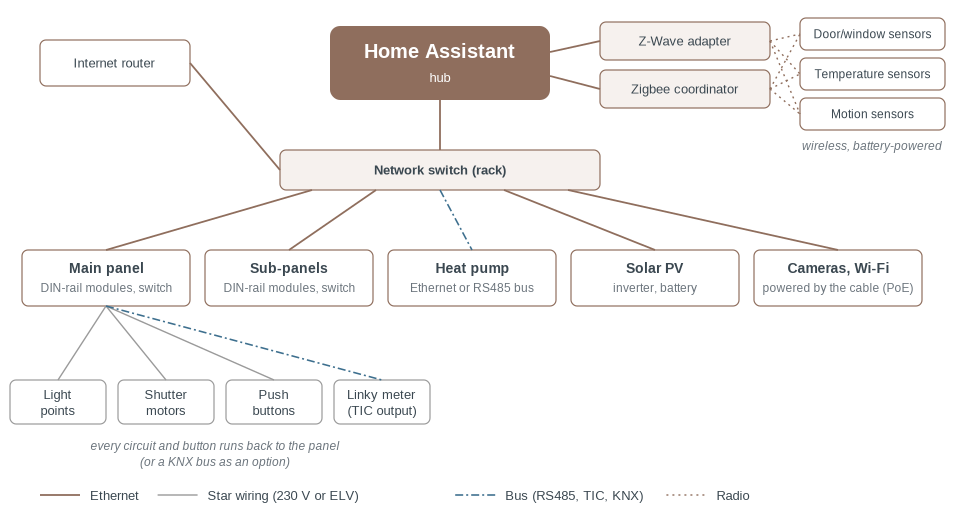
A device connected by cable depends neither on radio waves, nor on batteries, nor on the thickness of the walls. It is the most reliable and longest-lasting solution for everything that is fixed and powered: lighting, shutters, heating, electrical panels, solar production, cameras. It has to be planned during the building work: in a new build or a major renovation, the extra cost of wiring is small compared with the lifetime of the installation.
Small devices (door or window contact sensors, temperature sensors, motion detectors, buttons) are wireless by default. They run on battery for years, and their position can be chosen, then adjusted, without any building work. Presence sensors (millimetre-wave sensors, which detect a person who is not moving) are the exception: almost all of them are mains-powered, and their location is planned at the wiring stage.
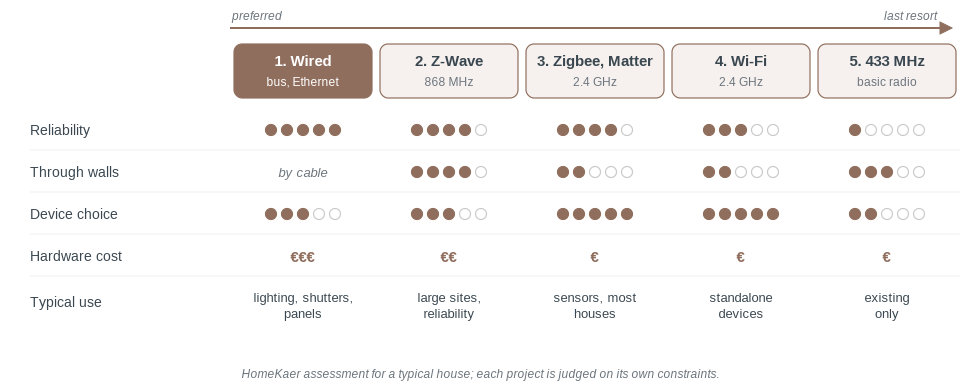
Our order of preference runs from wired to wireless: wired, then Z-Wave, then Zigbee and Matter, then Wi-Fi, with 433 MHz radio reserved for equipment already in place. For small sensors, Zigbee or Matter suit most homes (cost, choice of consumer devices, battery life); Z-Wave is the choice on large sites, or when reliability matters more than cost.
| Project | Lighting and shutters | Small sensors | Appliances (heating, solar, EV charger) |
|---|---|---|---|
| New build | KNX if the budget allows, otherwise Ethernet DIN rail modules, star wiring | Zigbee or Matter; Z-Wave on a large site | Dedicated integration, otherwise Modbus, over Ethernet cable or RS485 bus |
| Major renovation | Ethernet DIN rail modules; ESPHome controllers for a tight budget; KNX for a high budget | Zigbee or Matter; Z-Wave on a large site | Same |
| Light renovation | Wired for the circuits that already run to the panel; otherwise Z-Wave modules behind the switches (Zigbee possible in a house of ordinary size) | Zigbee or Matter; Z-Wave on a large site | Same, with cable to be pulled if possible |
| Existing installation | Integration of the system in place (KNX, wired system, radio shutters), supplemented with Z-Wave or Zigbee | Zigbee or Matter; Z-Wave on a large site | Integration of the existing equipment |
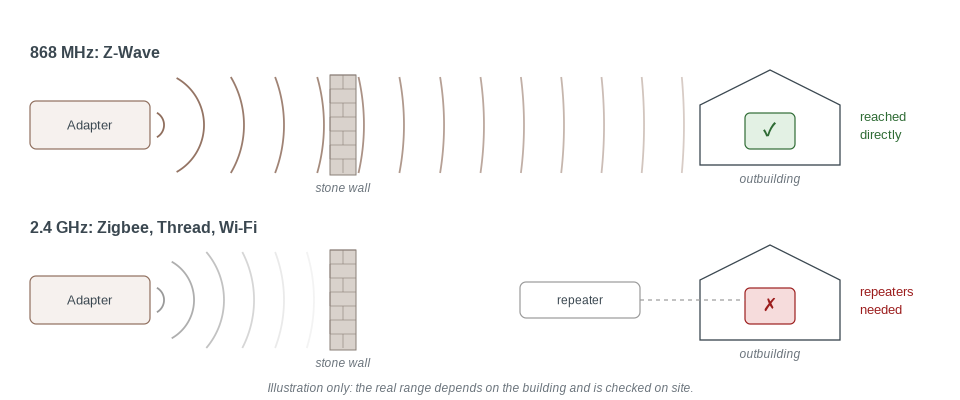
Large properties and thick walls – Zigbee, Thread and Wi-Fi use the 2.4 GHz band, whose range is limited. On a property with several buildings, with thick stone or concrete walls, or with distant outdoor equipment, they remain possible but require investment in the mesh (mains-powered repeater modules, additional gateways) to achieve sufficient range. Coverage cannot be guaranteed before it has been checked in real conditions, which may lead to extra costs. In these cases, we favour wired solutions or Z-Wave.
What to ask the other trades
- Window and shutter installer: wired shutter motors preferably; failing that, radio motors whose integration with Home Assistant is known (io-homecontrol with a local gateway, Z-Wave, Zigbee).
- Heating engineer or plumber: a heat pump with a Modbus or network interface, connected by cable.
- Solar PV installer: enabling local access (Modbus TCP) to the inverter or energy manager, with their installer account.
- Electrician: the wiring on the ‘Wiring to plan for’ page.
Wiring to plan for
This page can be handed to the electrician as it is. To be planned before the partition walls go up, in agreement with HomeKaer:
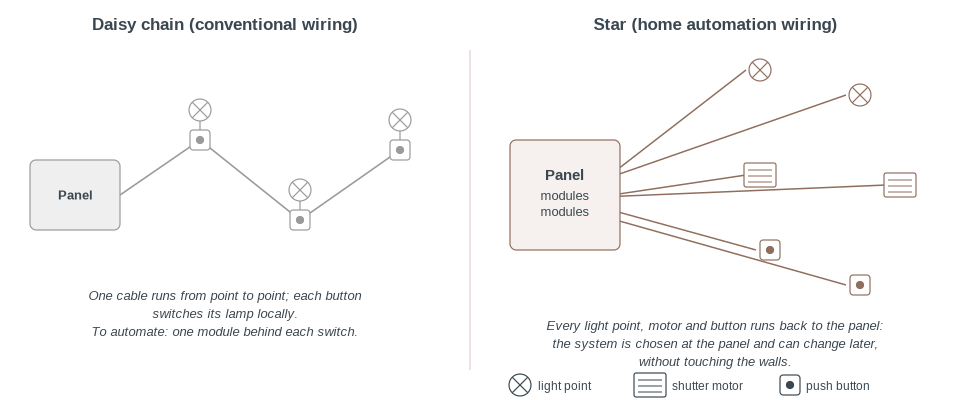
- Star wiring: bring the power supplies of the light points and shutter motors, and the push-button wires, back to the panel or sub-panel, rather than daisy-chaining them from one point to the next. This wiring keeps the choice of system open, and allows it to be changed later.
- Push-buttons: at 230 V for Ethernet DIN rail modules, as for an impulse relay; as a dry contact or at ELV (extra-low voltage) for ESPHome controllers and KNX inputs. H07V-U conductors suit both; running ELV and 230 V in the same conduit must be validated by the electrician (the French wiring standard NF C 15-100). KNX bus cable in addition, if KNX is chosen.
- Neutral and deep back boxes at every switch, so that a module can be fitted later.
- Presence sensors: a power supply at each planned location.
- Wall displays: at each location, a deep back box with live and neutral (for a 230 V display or a flush-mounted power supply), and a conduit with a network cable to the panel or the rack (for a tablet powered over the network cable).
- Space in the panel for the DIN rail home automation modules (leave spare rows).
- Ethernet cable to each panel and sub-panel, with a DIN rail switch, as well as to the solar inverter or energy manager, the EV charger, the cameras (PoE) and the Wi-Fi access points.
- Door phone or doorbell: a Cat 6 network cable from the rack, powered over the cable (PoE), and a cable from the panel to the door strike or the gate motor (details in ‘Door phones and doorbells’).
- RS485 bus (shielded twisted pair) to the appliances that only have Modbus RTU: heat pump, mechanical ventilation, meters.
- Linky meter: a cable from the TIC output to the panel, to monitor consumption.
- Links between buildings in outdoor network cable or fibre, and a powered, cabled central location for the radio gateways.
- Empty spare conduits to the loft, the garage, the gate and the outdoor areas.
Small battery-powered sensors (doors and windows, temperature, motion) need no wiring.
Installation, connection and electrical compliance remain the electrician’s responsibility. HomeKaer provides the list of circuits and devices, then configures and integrates the whole system.
Contact us
A first conversation is free and without commitment.
On-site work in Rennes and throughout Ille-et-Vilaine (Brittany, France).
Anywhere else, remotely: Home Assistant configuration, support and troubleshooting, custom development (integrations, ESPHome), advice and training.